Built by a seller

Commerce automation,
from sales data to robotic work

MadWare automates commerce operations for sellers.
It starts with a live operations app and extends to an AI assistant and physical work automation.

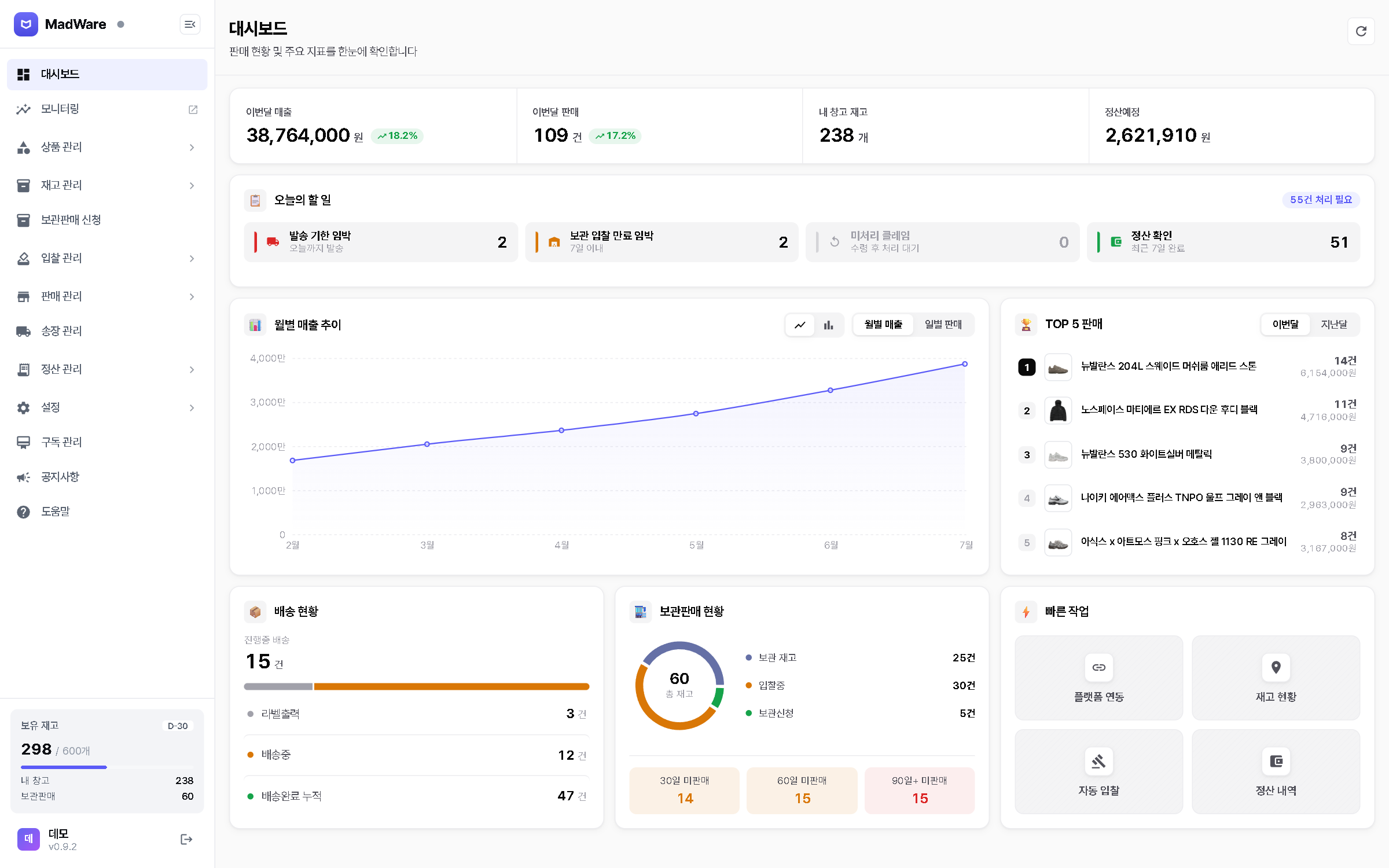
MadWare dashboard (Korean interface). Monthly sales and order counts, today's tasks, a monthly sales trend, top-selling items, and shipping and consignment status on one screen.
The live MadWare app (demo account)
Why we built it

A seller's time should go to decisions, not data entry

MadWare began as a tool a seller built for their own operations.

  1. Sales records were scattered across platforms and spreadsheets.
    Nothing can be automated until the data lives in one place.

  2. As features grew, finding the right screen became a new kind of repetitive work.
    A request in plain language should be enough.

  3. Even as screen work shrinks, boxes still have to be opened, labeled, and moved by hand.
    Ahead of general-purpose robots, we are preparing the field data and training data they will need.

Roadmap

Three stages connected by
sales data

The same data drives work inside the app and physical work, and every result is fed back as data.

Sales data Now Long-term direction: general-purpose robots 1 Stage 1 MadWare app The operations app that collects sales data Live 2 Stage 2 AI assistant Plain-language requests, carried out in the app Private beta 3 Stage 3 Inspection photo station Photographs the item and matches the order Planned 4 Stage 3 Box-handling robot Label application and storage sorting for standard-size boxes Planned 5 Stage 3 Rental Bundled with MadWare for a monthly fee Planned Sales data Now Long-term direction: general-purpose robots 1 Stage 1 MadWare app The operations app that collects sales data Live 2 Stage 2 AI assistant Plain-language requests, carried out in the app Private beta 3 Stage 3 Inspection photo station Photographs the item and matches the order Planned 4 Stage 3 Box-handling robot Label application and storage sorting for standard-size boxes Planned 5 Stage 3 Rental Bundled with MadWare for a monthly fee Planned
  • Live
  • Private beta
  • Planned
The chart shows sequence only; no timeline has been set.
STAGE 1Live

Software automation

MadWare app (Windows desktop)

An operations app that collects sales data for limited-edition sellers

  • Price management
  • Transaction sync
  • Inventory and stock counts
  • Consignment management
  • Shipping and tracking
  • Settlement reports
DATAOrders, inventory, storage locations, inspection and receiving, shipping, settlement
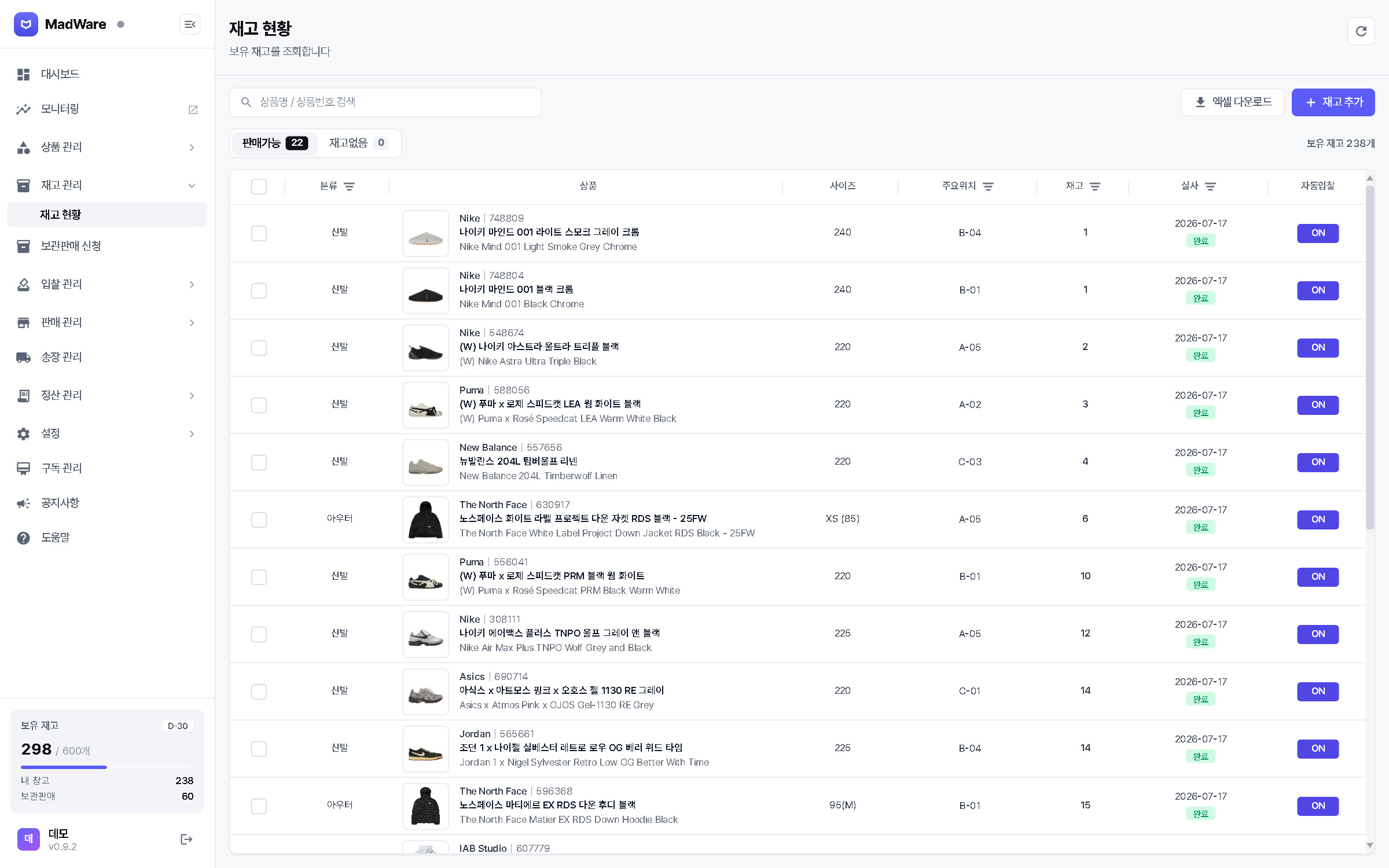
MadWare inventory screen (Korean interface). Each item is listed with its size, storage location, quantity, and stock-count date.
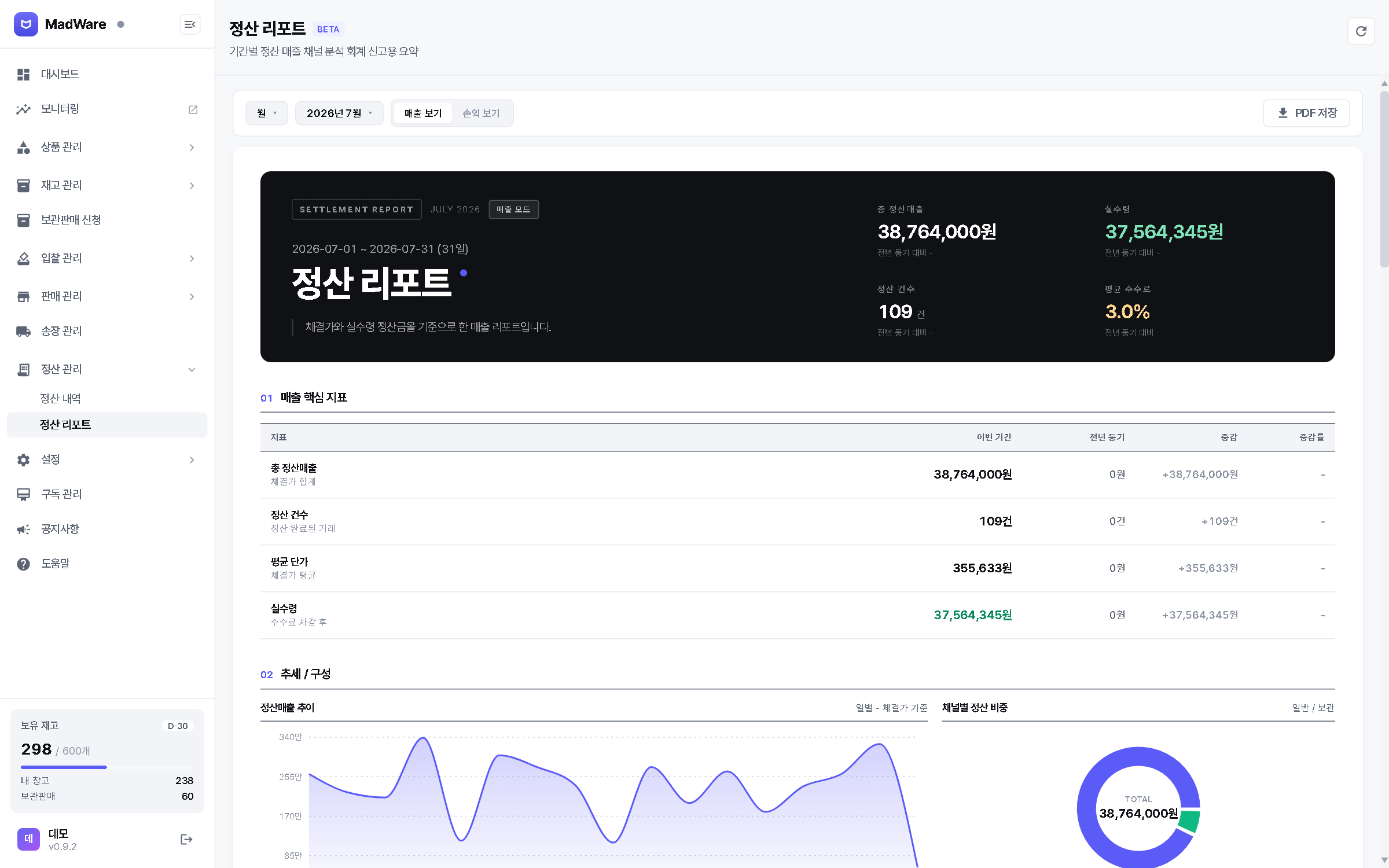
MadWare settlement report screen (Korean interface). Settled sales, net payout, settlement count, and average fee for the period are summarized.
Inventory and settlement report screens (demo account)
STAGE 2Private beta

AI assistant

An assistant built into MadWare

Plain-language requests, carried out inside the app

  • Runs app features through tool calls
  • High-impact actions run only after user approval
  • Regression evaluations and cross-account data isolation tests
Coming to the live app after validation
How the assistant worksDiagram
  1. 1RequestThe user asks in everyday language
  2. 2Data lookupChecks order and inventory records in MadWare
  3. 3Execution planPicks which app features to use, and in what order
  4. 4User approvalHigh-impact actions are confirmed by the user first
  5. 5Run app featuresCarried out through tool calls
STAGE 3Planned

Physical work automation

Inspection photo station, box-handling robot, rental

Field data and robot training data come first

  • The same data becomes work instructions for robots
  • Target tasks: inspection and receiving, label application, storage sorting
  • Work results → recorded as data → training data for the next step

Everything below is a plan. Timelines, equipment models, and pricing have not been decided.

How data becomes work instructionsDiagram
Sales data in MadWare
Work instructions
Inspection and receivingPhoto station
Shipping labelsRobot arm
Storage sortingRobot arm
Work results
Handling recordsTraining data for the next step

THREE STEPS

Concept illustration Order record Match Camera Size label
STEP 1
Inspection photo station

Photographs the label and condition, matches the order, and keeps the photos as training data

Concept illustration Shelf Robot arm Standard box Shipping label
STEP 2
Box-handling robot

Label application and storage sorting for standard-size boxes

Concept illustration Photo station + Workstation + MadWare One bundle, monthly fee
STEP 3
Rental

Rented together with MadWare for a monthly fee

PILOT USERS

Pilot with mid-sized sellers and small fulfillment warehouses, then roll out to individual sellers

HOW THE DATA IS USED
  • Inspection photos→training data for condition checks
  • Handling records→training data for robot tasks
  • Return and failed-inspection records→early warnings of likely inspection failures
Long-term direction

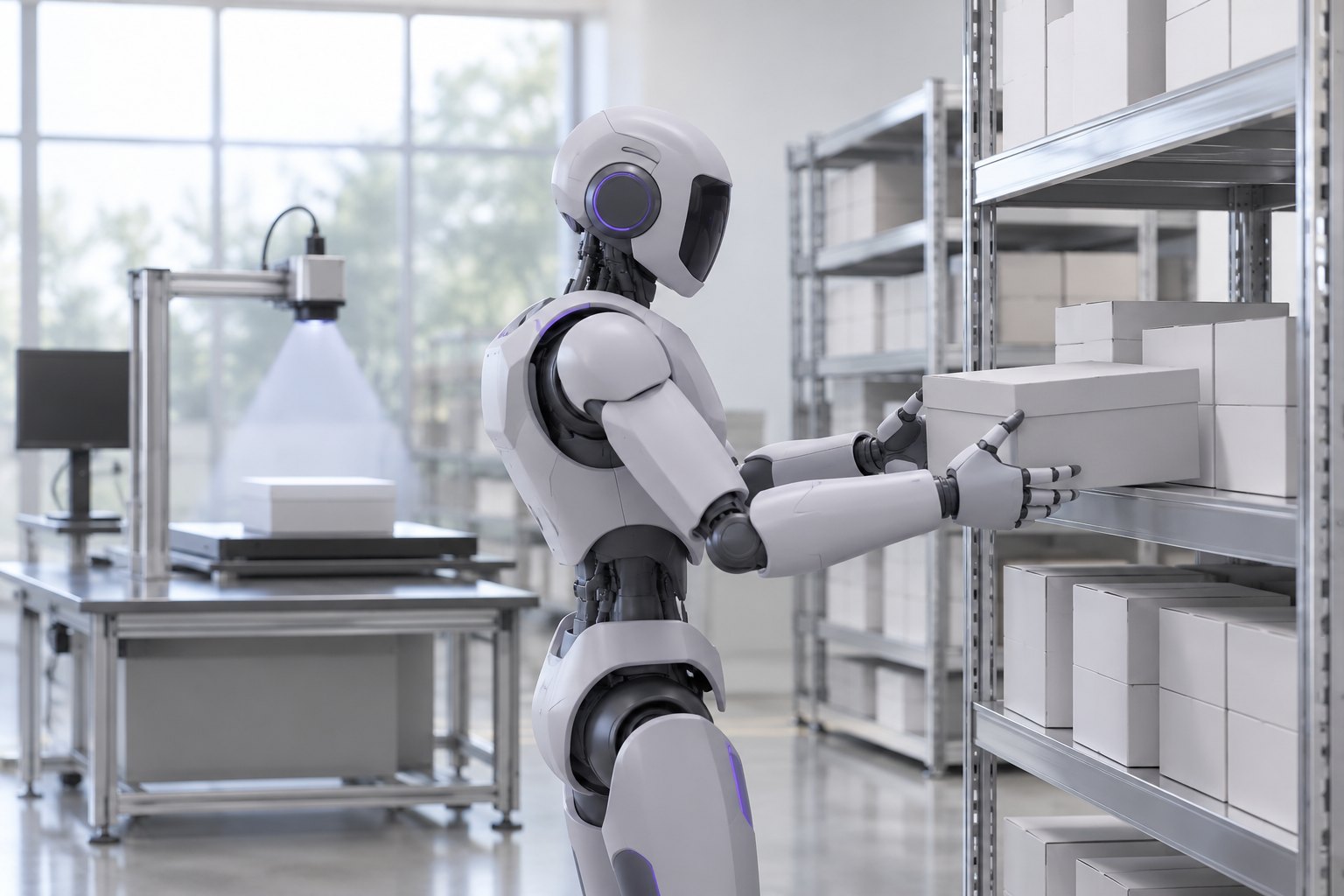
Extend the same data and work instructions to general-purpose robots, including humanoids
  • Small sites with varied tasks and low volume need a single robot that can handle many of them
  • The same data and work instructions can be reused across robot types
  • Laying the groundwork for individual sellers to adopt general-purpose robots as they become widely available
Concept image of a general-purpose robot placing a box on a shelf in a small stockroom Concept image

We are evaluating NVIDIA Jetson and synthetic data from Isaac Sim for recognition at the photo station, and Isaac Sim and Isaac Lab for validating the robot workstation.
For extending to general-purpose robots, we are considering Isaac GR00T.

Company

Developed inside a working sales operation

MadWare is developed and operated by Will of Noma Ltd.

  • Handles its own buying and sellingOverseas sourcing, customs, inspection, listing, and shipping, all in-house
  • Runs its own sales operations on MadWareInventory, listings, and settlement are managed in MadWare
  • Turns problems found in daily operations into featuresIssues found during daily work are fixed in the next release

For questions about the company or the product, email support@madware.app.

Send an email